MIG servers July 22, 2026
You just provisioned a new dedicated server. You maxed out the RAM, upgraded to the latest enterprise multi-core CPUs, and optimized your database configurations. Yet, during peak traffic hours, your application still experiences micro-stutters, and your database query times spike. Why?
The answer usually lies in the most overlooked component of server architecture: The Storage Bottleneck.
In modern infrastructure, the weakest link is rarely the compute or memory layer; it is the storage I/O. No matter how incredibly fast your processors are, if your storage drives cannot feed data to the CPU quickly enough, those expensive processor cores simply sit idle, waiting for data (a state known as high I/O wait).
For years, SATA Solid State Drives (SSDs) were the gold standard for fixing slow hard drives. But as high-frequency logging, real-time analytics, and heavy e-commerce workloads have evolved, legacy SATA interfaces have hit a hard physical limit. To completely eliminate storage latency, the industry has shifted to Non-Volatile Memory Express (NVMe).
FIf you are planning your next infrastructure upgrade, understanding the real-world impact of ssd vs nvme hosting performance is critical. In this guide, we will break down the exact architectural differences, analyze the I/O benchmarks, and help you determine exactly when an NVMe upgrade is mandatory—and when a standard SATA SSD is still good enough.
Table of Contents
The Architecture Difference: AHCI vs. PCIe Bus
To understand why a storage bottleneck happens, you have to look at the data pathway. The speed of a drive is not dictated solely by the flash memory chips inside it; it is heavily restricted by the interface it uses to communicate with the CPU.
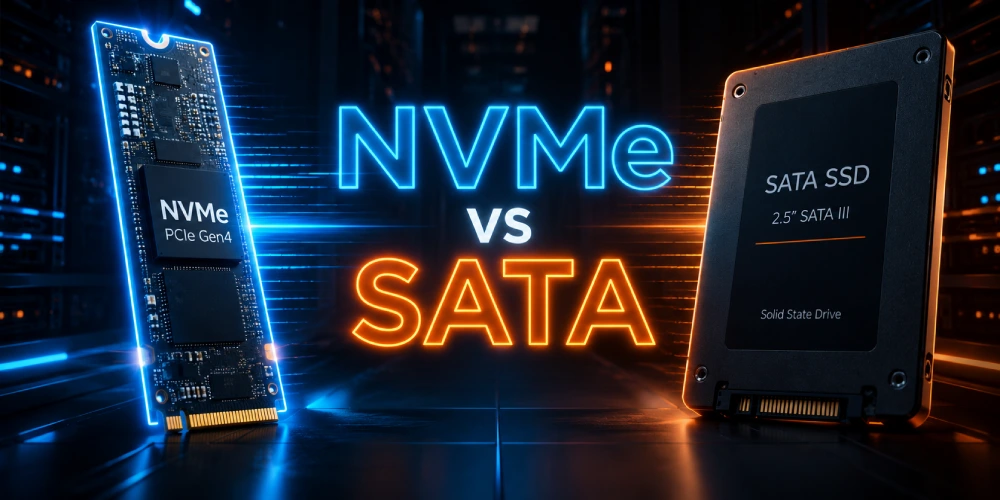
When evaluating an nvme vs sata ssd server deployment, the fundamental difference lies not just in the storage medium itself, but in how the data travels across the motherboard.
SATA and the AHCI Bottleneck SATA (Serial ATA) SSDs utilize the AHCI (Advanced Host Controller Interface) protocol. AHCI was originally designed in the early 2000s for mechanical hard disk drives (HDDs) with spinning platters and moving read/write heads. Because mechanical drives are inherently slow and process data sequentially, AHCI was built with a single command queue that can hold a maximum of 32 commands at a time.
Even though modern SATA SSDs have fast flash memory, they are forced to funnel their data through this legacy AHCI controller. When a busy database attempts to execute thousands of simultaneous read/write requests, the 32-command queue instantly fills up, forcing the CPU to wait.
NVMe and the PCIe Advantage NVMe (Non-Volatile Memory Express) was engineered from the ground up specifically for solid-state storage. Instead of routing traffic through a legacy SATA controller, NVMe drives connect directly to the motherboard’s PCI Express (PCIe) bus. This provides a direct, unhindered pipeline straight to the CPU and system memory.
The architectural shift in parallel processing is massive:
- Instead of 1 command queue, the NVMe protocol supports up to 64,000 individual queues.
- Instead of 32 commands per queue, each NVMe queue can hold up to 64,000 commands simultaneously.
By replacing the AHCI storage path with NVMe submission and completion queues directly in host memory, the operating system can distribute I/O operations across multiple CPU cores. This allows an NVMe-equipped server to process millions of operations concurrently without locking up the system architecture.
The Ultimate Performance Showdown (The Numbers)
Theoretical architecture differences translate directly into measurable hardware capabilities. When measuring real-world nvme storage servers speed, the benchmarks reveal a massive gap in throughput, concurrency, and response times.
Below is a direct comparison of the hardware limits between a standard SATA III SSD and a modern PCIe Gen4 enterprise NVMe SSD:
| Performance Metric | Standard SATA SSD (AHCI) | Enterprise NVMe SSD (PCIe Gen4) | The Performance Gap |
|---|---|---|---|
| Sequential Read/Write | ~550 MB/s | 7,000+ MB/s | ~12x Faster Throughput |
| Random I/O (IOPS) | ~80,000 IOPS | 500,000+ IOPS | 6x Higher Concurrency |
| Storage Latency | ~100 Microseconds (µs) | Sub-20 Microseconds (µs) | ~5x Lower Wait Times |
Read & Write Speeds (Throughput)
Sequential throughput dictates how fast large, contiguous blocks of data can be written to or read from the drive. Due to the physical limitations of the SATA III interface, SATA SSDs will physically max out at around 550 MB/s to 600 MB/s.
In contrast, enterprise NVMe drives utilize multiple PCIe lanes to push data in excess of 7,000 MB/s. This 12x faster throughput is critical when your server needs to execute massive database dumps, generate heavy analytical reports, or process large media files. With NVMe, long-running batch jobs complete in minutes rather than hours.
Input/Output Operations (IOPS)
IOPS measures how many independent read/write operations the drive can execute concurrently in a single second. While a SATA SSD peaks at roughly 80,000 IOPS, a data-center-grade NVMe drive easily sustains 500,000+ IOPS.
Why does this matter for databases? When a high-traffic PostgreSQL or MySQL database handles thousands of simultaneous user queries, it relies entirely on high IOPS. If the drive hits its IOPS ceiling (as seen with SATA), new queries are forced into a disk queue. This queueing causes a spike in CPU I/O wait, leading directly to slow application response times. NVMe’s massive IOPS capacity ensures your database can handle thousands of concurrent transactions without queueing a single request.
Latency Matters
Throughput and IOPS determine volume, but latency determines response time, how long it takes for a single I/O request to complete. Because SATA data must pass through the legacy AHCI controller overhead, its baseline latency usually hovers around 100µs.
Because NVMe drives communicate directly with the CPU via the PCIe bus, they achieve sub-20 microsecond (µs) latency. In write-heavy applications—such as intensive financial transaction logging or real-time gaming servers—this sub-20µs response time means database locks are released instantly, preventing application-level transaction stalling.
Workload Match: When to Choose What?
Upgrading your storage layer should always solve an observed constraint. Not every application requires sub-20 microsecond latency. Understanding your specific workload architecture is the key to making a cost-effective infrastructure decision.
When is a SATA SSD "Good Enough"?
A standard SATA SSD is still a highly viable option when storage capacity and cost-efficiency matter more than raw I/O throughput. You do not need to upgrade if your workload falls into these categories:
- Basic Web Hosting & Static Content: If you are hosting static HTML websites, basic blogs, or assets served primarily through a Content Delivery Network (CDN), your performance is network-bound, not storage-bound.
- In-Memory Databases: If your active database dataset is small enough to fit entirely within the system's RAM (buffer cache), the storage drive is rarely accessed for read queries.
- Backup & Cold Storage: For archiving logs, maintaining off-site versioned backups, or storing infrequently accessed media files, the 550 MB/s sequential speed of a SATA SSD is more than sufficient.
- CPU or API-Bound Applications: If your application spends most of its time waiting on external API responses or complex CPU calculations rather than reading/writing local files, faster storage will not yield a noticeable improvement.
When are NVMe Dedicated Servers "Mandatory"?
If your server monitoring tools show rising CPU I/O wait times, high disk queue depths, or slow transaction commits during peak hours, you have a storage bottleneck. In these environments, deploying nvme dedicated servers is no longer optional—it is a mandatory architectural requirement:
- Heavy Relational Databases (MySQL / PostgreSQL): Relational databases rely heavily on synchronous writes to ensure data integrity. When processing thousands of concurrent queries, Write-Ahead Logging (WAL) and transaction-log flushes can instantly overwhelm a SATA drive. NVMe ensures these commits happen in microseconds, preventing database locks.
- High-Traffic E-Commerce Stores: Platforms like Magento and WooCommerce generate highly dynamic, uncacheable queries (e.g., shopping cart updates, complex product filtering). NVMe drives ensure instant query execution, directly reducing page load times and preventing cart abandonment during traffic spikes.
- Intensive Financial Databases: While the actual logic of trading algorithms executes in RAM, financial platforms require bulletproof, real-time transaction logging, risk analytics, and ledger synchronization. NVMe provides the massive IOPS required to log these financial records without slowing down the active application layer.
- Virtualization & Proxmox Clusters: In a hypervisor environment (Proxmox, VMware), multiple virtual machines share the underlying storage. This creates random, overlapping read/write patterns known as the "I/O blender effect." NVMe drives easily handle this massive concurrency, allowing for higher VM density without noisy-neighbor performance degradation.
- AI/ML Data Processing: When training machine learning models or processing Large Language Models (LLMs), the GPU requires a constant, massive stream of data. If the storage is too slow, the expensive GPUs sit idle. PCIe Gen4 NVMe storage ensures continuous, high-bandwidth data delivery to the compute layer.
The SRE Perspective: RAID & Reliability on NVMe
When migrating to an all-flash NVMe architecture, traditional data center rules change. Deploying the fastest drives on the market is only half the battle; how you configure their redundancy determines your actual real-world performance.
For Site Reliability Engineers (SREs), maintaining high availability without sacrificing throughput requires a complete shift away from legacy storage management.
The Hardware RAID Bottleneck (Why Legacy Controllers Fail)
For decades, the standard practice for SATA/SAS servers was to install a dedicated Hardware RAID controller card. However, using a traditional hardware RAID controller with NVMe drives is a critical architectural mistake.
Here is the exact math behind the bottleneck: A single PCIe Gen4 NVMe drive can push over 7,000 MB/s. If you put four of these drives into a RAID 10 array, the total potential throughput is a massive 28,000 MB/s. However, most enterprise hardware RAID controllers connect to the motherboard via a PCIe x8 slot. While the theoretical maximum is 15.75 GB/s, overhead physically caps the total real-world bandwidth to roughly 14,000 MB/s (or less, depending on the controller's onboard processor).
By routing your NVMe drives through a hardware RAID card, you instantly throttle your throughput by 50% or more, completely defeating the purpose of buying NVMe storage in the first place.
The Solution: Advanced Software RAID & ZFS
To unlock 100% of your NVMe performance while maintaining strict data redundancy, enterprise architectures must rely on Software RAID (Linux mdadm), ZFS mirroring, or Intel VROC (Virtual RAID on CPU).
- Direct PCIe Access: Software RAID allows the NVMe drives to remain directly connected to the motherboard's PCIe lanes. There is no middleman controller to choke the data transfer.
- CPU Power: Modern server CPUs (like AMD EPYC and Intel Xeon) have dozens of powerful cores. Software RAID utilizes a microscopic fraction of this massive CPU processing power to calculate parity and mirror data, easily outperforming the weak processing chips found on hardware RAID cards.
- ZFS Integrity: Using ZFS provides built-in data scrubbing, self-healing against silent data corruption, and copy-on-write snapshots, making it the superior choice for high-availability NVMe arrays—provided your server has ample RAM to support its Adaptive Replacement Cache (ARC).
Enterprise Endurance: DWPD and PLP
Beyond RAID, a true SRE evaluates drive endurance. When configuring an NVMe dedicated server for write-intensive workloads (like database logging or hypervisors), simply looking for the word "NVMe" is not enough. You must ensure the drives feature a high DWPD (Drive Writes Per Day) rating to sustain continuous 24/7 data writing without early degradation. Additionally, enterprise NVMe drives must include onboard Power-Loss Protection (PLP) capacitors, ensuring that synchronous database commits are flushed safely to the flash memory even during an abrupt power failure.
- SRE Golden Rule: RAID is not a backup. While a ZFS mirrored NVMe array will keep your database online during a hardware drive failure, it will instantly mirror an accidental DROP TABLE command or a ransomware encryption. Always maintain versioned, off-site backups with strict Recovery Point Objectives (RPO).
Cost vs. ROI: Is the NVMe Upgrade Worth It?
When planning a new infrastructure deployment, IT managers and business owners often ask: "Should we allocate extra budget for NVMe over SATA? Is an NVMe server worth it?"
If you look purely at raw nvme dedicated server pricing, it appears as a premium over standard SATA servers. However, in an enterprise environment, hardware should be evaluated on Return on Investment (ROI) rather than just the upfront cost. Here is a factual breakdown of how the cost of all-flash nvme hosting actually saves your business money:
1. Server Consolidation (Do More with Less)
Due to the 80,000 IOPS limit of standard SATA SSDs, handling heavy database queries might require you to load-balance across 3 or 4 separate servers. Because a single PCIe Gen4 NVMe drive delivers over 500,000 IOPS, one NVMe server can easily handle the workload of multiple SATA machines. By drastically reducing your hardware footprint, power consumption, data center rack space, and per-server software licensing (such as cPanel, LiteSpeed, or Windows OS), a single NVMe server is vastly more cost-effective than scaling out legacy SATA infrastructure.
2. E-Commerce Conversions & Revenue Protection
Speed is directly tied to revenue. Industry data shows that every 100-millisecond delay in page load time can reduce e-commerce conversion rates by up to 7%. When concurrent traffic spikes on a Magento or WooCommerce site, SATA drives get bogged down in disk queues, slowing down the checkout process. NVMe’s sub-20µs latency executes complex database queries instantly, preventing cart abandonment. The recovered sales revenue from faster checkouts typically pays for the NVMe upgrade within the first month.
3. Maximizing Expensive CPU Utilization
You may have invested heavily in high-end 64-core AMD EPYC or Intel Xeon processors. However, if your storage I/O is slow, those expensive CPU cores spend most of their time sitting idle, waiting for data to be read from the disk (a state known as high I/O Wait). NVMe drives feed data to the CPU instantly, ensuring you extract 100% of the performance capabilities from your expensive compute hardware.
- The Business Verdict: If you are merely hosting static files or cold backups, SATA is sufficient. But if your server directly generates business revenue (via financial transactions, heavy e-commerce, or SaaS applications), NVMe is not an expense—it is a critical business investment that pays for itself.
The End-to-End Architectural Reality
Ultimately, throwing more RAM and CPU cores at a performance problem will not resolve an underlying storage bottleneck. As the data shows, the primary limitation of SATA SSDs is not the flash memory itself, but the legacy AHCI protocol that physically restricts concurrent I/O operations. If your infrastructure handles intensive relational databases, heavy virtualization clusters, or real-time financial logging, relying on a SATA interface will inevitably force your processors into a continuous state of I/O wait.
Scaling a modern application requires an end-to-end data path that matches your compute power. By utilizing direct PCIe lanes, NVMe enables the massive parallelism required to keep CPU cores actively processing data rather than waiting for it. When paired with proper software-defined redundancy—such as ZFS mirroring or mdadm—NVMe delivers both extreme throughput and enterprise-grade reliability by completely bypassing legacy hardware controllers.
If your workload demands this level of zero-bottleneck architecture, MIG servers provides highly customizable, bare-metal NVMe Dedicated Servers engineered specifically with enterprise PCIe Gen4 drives and advanced software RAID configurations.
 Recent Topics for you